- 2025 年 2 月 15 日
登入問題?快速修復與支援
- 療癒智慧
- 支援指南
1) 確認您在正確的網站上
請務必瞭解,療癒智慧有兩個網站平台:
www.healingwisdom.com- 有關療癒智慧資訊的主要網站。
portal.healingwisdom.com- 學員平台。您可在此存取培訓資源、時間表和 Zoom 連結。若要登入,請點選頁面右上方的「登入」按鈕,或造訪portal.healingwisdom.com/login。
ㅤ
2) 確認您的登入憑證
登錄時,請確保您使用與註冊培訓時相同的電子郵件地址。確保輸入的方式與註冊確認電子郵件中的方式完全相同。
ㅤ
3) Enter your verification code
When prompted during login, Podia (the platform hosting our Student Portal) emails you a 6-digit verification code to protect your account. This email is legitimate, and the code is valid for 30 minutes.
Keep the login page open. Do not close, reload, or navigate away from it. Check your email in a separate tab or on another device, then enter the code on the original login page.
Allow a few minutes for the email to arrive. Enter the code carefully, without extra spaces.
-
Use the latest code. Reloading the login page or starting again in another tab or browser generates a new code and invalidates the previous one. If your code has expired, restart at portal.healingwisdom.com/login to get a new one.
ㅤ
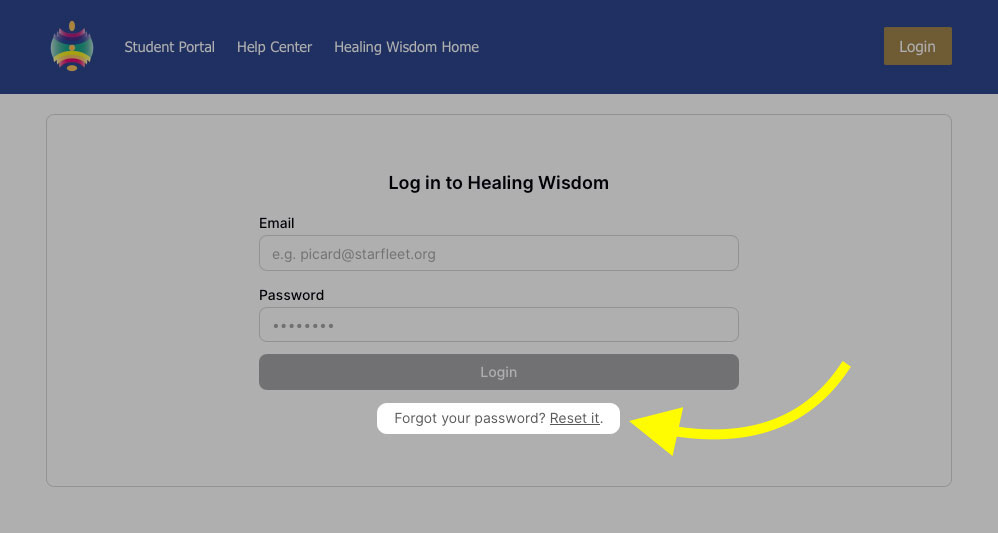
4) Reset your password
如果無法辨識您的密碼,您可以在登入頁面上重新設定密碼。
ㅤ
5) Try a different browser
有時候,問題是由於特定的瀏覽器造成的,例如:
有問題的瀏覽器擴充套件
您瀏覽器的密碼自動填寫功能可能會自動輸入舊密碼
Cookies 和快取記憶體可能儲存過時的資訊
解決方案:
嘗試不同的瀏覽器
ㅤ
仍有問題?
如果您已嘗試以上所有方法,但仍無法登入,請立即與我們聯絡。
發送電子郵件至portal@healingwisdom.com,並提供以下資訊:
受影響帳戶的名稱和電子郵件地址
您遇到問題的訓練/活動
您嘗試過的步驟
您遇到的錯誤訊息/螢幕截圖